
2026 R4 Jobpac Release
Mobile Approvals Activation - Mobile User Setup
New Mobile User Setup option preparing your organisation for upcoming Mobile Approvals functionality.
Overview
Mobile Approvals is coming to Jobpac Connect. Once released, users will be able to approve business transactions directly from the native Jobpac Mobile application on iOS and Android devices.
Supported approval types will include Purchase Orders, Invoices, Subcontracts, Subcontract Payments and Subcontract Variations.
While Mobile Approvals is not yet available, this release introduces a new setting in Mobile User Setup that prepares your organisation for the upcoming functionality.
What's Coming
- Approve Purchase Orders from the Jobpac Mobile app.
- Approve Invoices while away from your desk.
- Approve Subcontracts and Subcontract Variations.
- Approve Subcontract Payments from a mobile device.
- Keep approval workflows moving regardless of location.
New Mobile User Setup Option
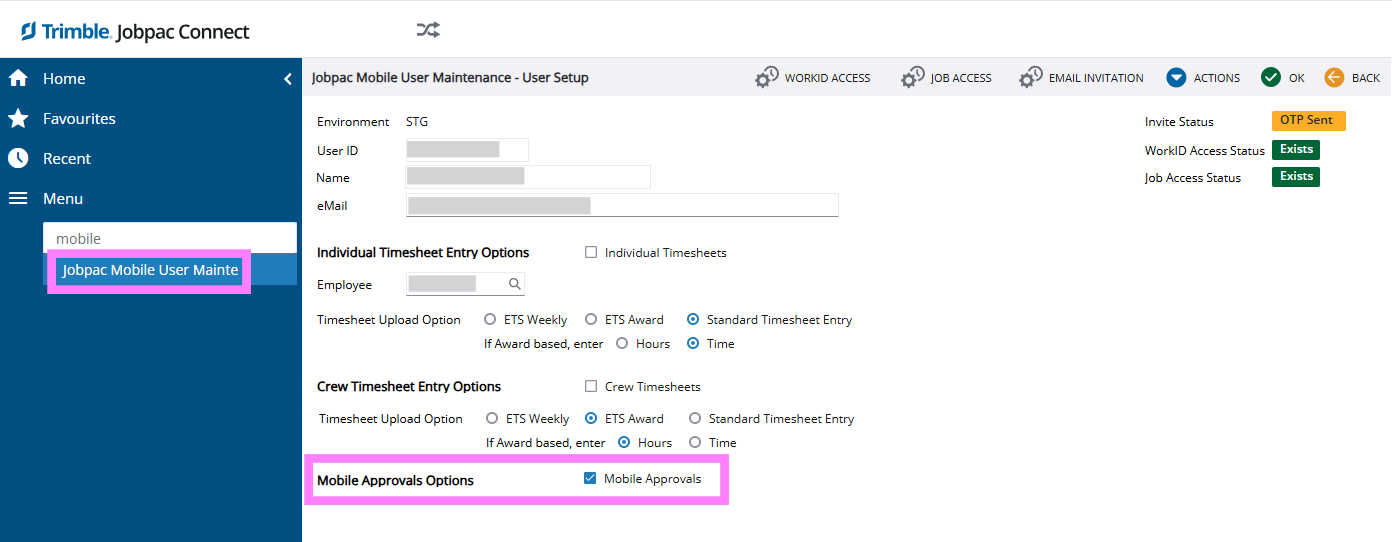
A new option has been added to the Mobile User Setup screen that allows administrators to activate Mobile Approvals for a mobile user.
At this stage, the setting is being introduced ahead of the Mobile Approvals feature release so organisations can familiarise themselves with the configuration options.
Example
What You Need to Do
No immediate action is required.
The new Mobile User Setup option has been added in preparation for the upcoming Mobile Approvals release. Additional guidance and activation instructions will be provided closer to launch.
Important Notes
Mobile Approvals functionality is not enabled simply by upgrading to this release.
This update introduces the supporting configuration required for future Mobile Approvals capability.
Comments
Article is closed for comments.