
2026 R4 Jobpac Release
Related Content for Dockets
Docket attachments can now flow through the invoice process using Related Content.
Overview
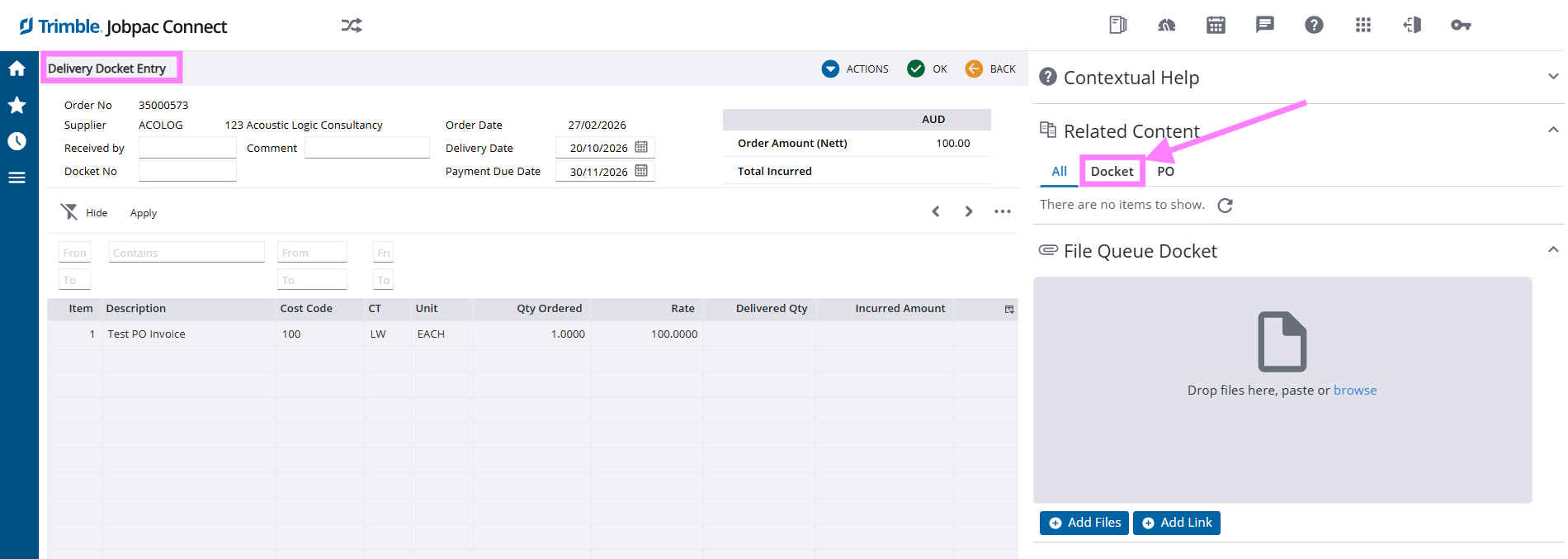
A new docket-specific upload option has been added to the Related Content section within Delivery Docket Entry.
Docket attachments uploaded here will automatically travel with the related Purchase Order and remain available throughout the invoice processing workflow.
What's New
Users can now upload docket-specific documentation directly against a Delivery Docket using Related Content.
Once attached, the docket remains linked to the transaction and is accessible throughout subsequent processing steps.
Example
How It Works
- Create or maintain a Delivery Docket.
- Upload supporting documentation using the new docket-specific Related Content option.
- Save the Delivery Docket.
- The attachment remains linked to the associated Purchase Order.
- The docket can then be viewed throughout the Invoice Processing workflow.
Benefits
- Centralises supporting docket documentation.
- Improves visibility during invoice verification.
- Reduces the need to store or retrieve documents from separate locations.
- Provides easier access to supporting information throughout the AP process.
- Improves auditability of delivery-related records.
Viewing Docket Attachments
Attachments uploaded in Delivery Docket Entry can be accessed from the Docket tab within Related Content as the invoice progresses through the workflow.
This ensures supporting documentation remains readily available to users reviewing, matching or processing invoices.
Important Note
This enhancement only affects the handling of docket attachments and does not change existing invoice processing workflows.
Comments
Article is closed for comments.