
2026 R4 Jobpac Release
PTA Reporting Updates for QBCC Certification
Recent reporting format updates released as part of the PTA Reporting Suite.
Overview
As part of a recent patch, three updates have been released to the PTA Reporting Suite.
These updates are accessed via the PTA Reconciliation Report and are automatically enabled.
Reformat of the RTA Ledger
The RTA Ledger has been reformatted to match QBCC requirements.
This report now includes:
- Bank Account section
- Trustee section
The format is now the same as the PTA Ledger format.
PTA & RTA Bank Reconciliation
The PTA and RTA Bank Reconciliations have been completely rewritten to comply with QBCC certification requirements.
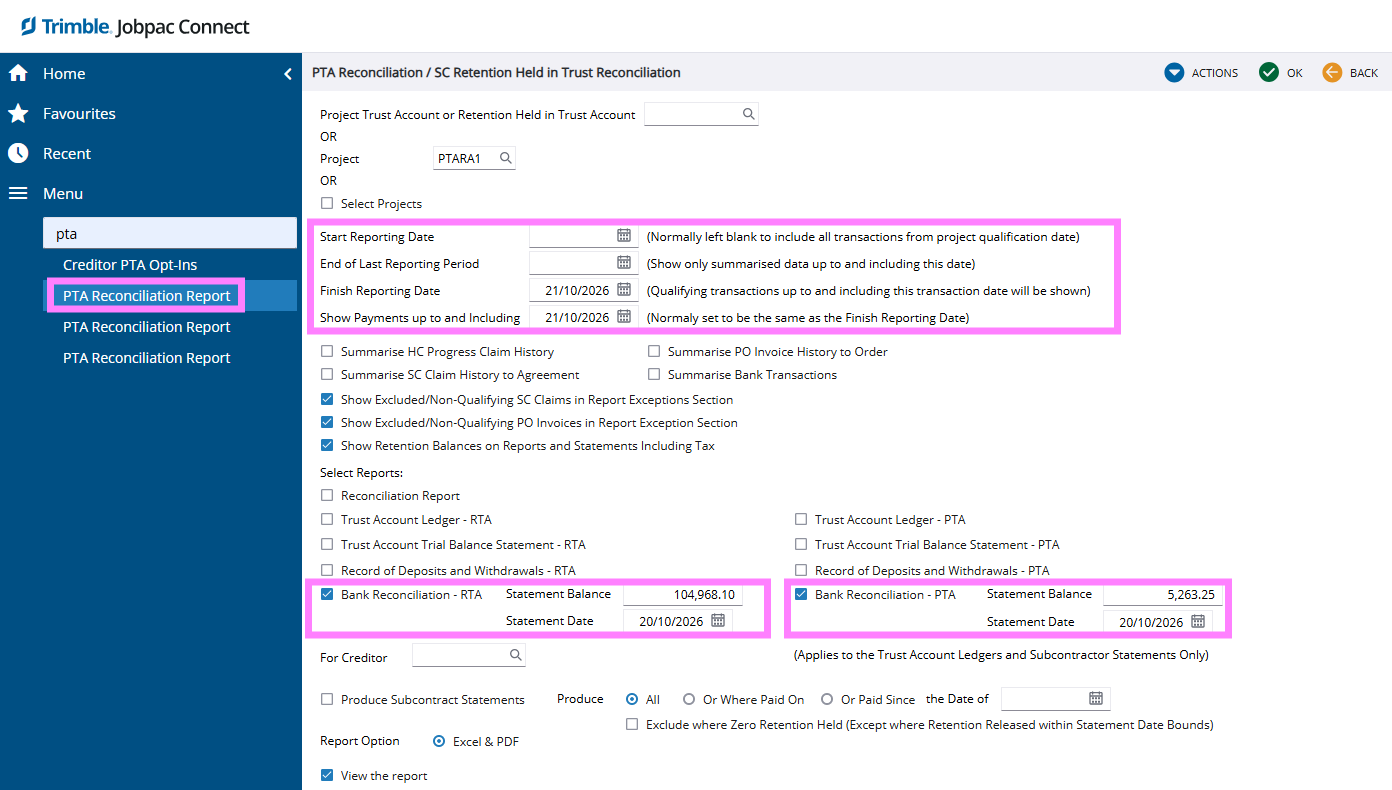
In order to produce your Monthly PTA and RTA Bank Reconciliations, you need to enter:
- Statement Balance
- Statement Date
If you are producing a Bank Reconciliation historically, ensure the Reporting Dates at the top of the screen only include transactions in the ledger up to that date.
How the New Reconciliation Works
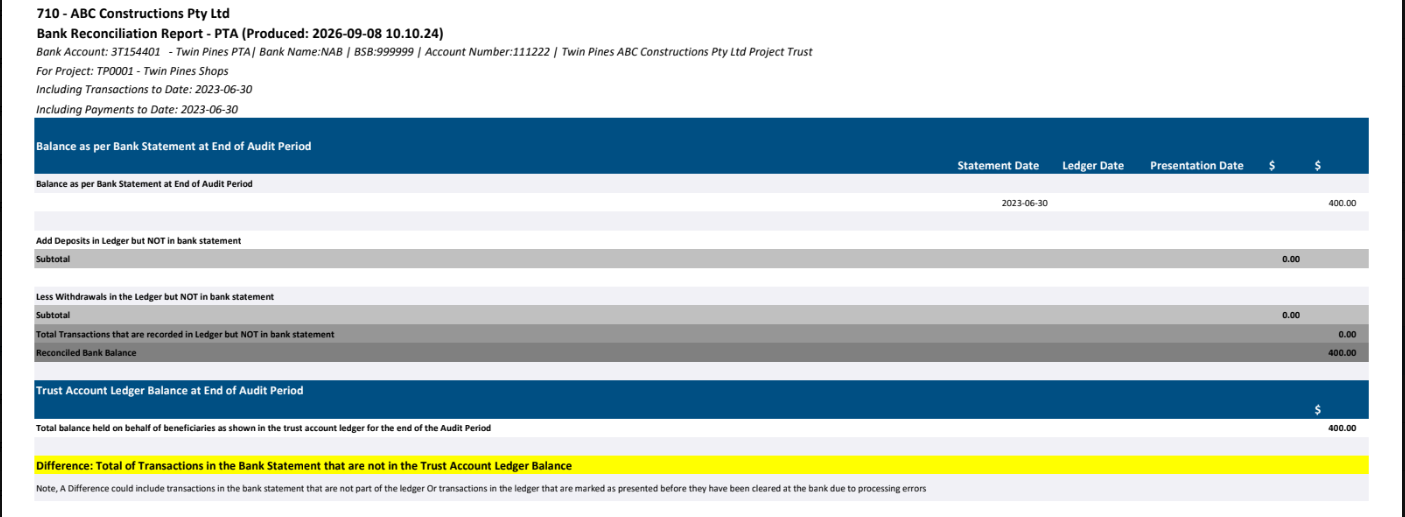
The new PTA and RTA Bank Reconciliation reports use transactions from the respective Bank Account sections of the PTA and RTA Ledgers as their basis.
You are reconciling the Bank Account sections of your Ledgers to the physical bank balance.
Trust Journal Work Centre Considerations
It is important to ensure that you have actioned transactions in your Trust Journal Work Centre (TJWC) that relate to the Bank Account you are reconciling.
Examples include:
- Retention Transfers
- Paid from Wrong Account transactions
- Received to Wrong Account transactions
You need to have either created and posted Trust Journals from these transactions, or flagged TJWC transactions as Transferred, otherwise they are likely to show as not presented (Outstanding) in the PTA/RTA Bank Reconciliation.
Report Sections
- Header
Report header details, Bank Statement Value and Date entered on the front screen. - Outstanding Deposits
Deposits in the Ledger that are not in the Bank Statement based on the presentation date of the Ledger transaction. Unpresented Ledger transactions or transactions with a presentation date greater than the Statement Date will show as outstanding. - Journal Presentation Dates
For Journals, the Transaction Date of the Journal Header is used as the presentation date unless you are using the New Bank Reconciliation with Bank Feeds, in which case the allocated presentation date is used. - Totals & Differences
Includes reconciliation totals and variance calculations.
Totals & Differences
This section includes:
- Total of transactions that are recorded in the Ledger but not in the Bank Statement.
- Reconciled Bank Balance.
- Total Balance held on behalf of Beneficiaries as shown in the Trust Account Ledger for the end of the audit period.
Difference - Total of transactions in the Bank Statement that are not in the Trust Account Ledger Balance.
Running Reports by Creditor
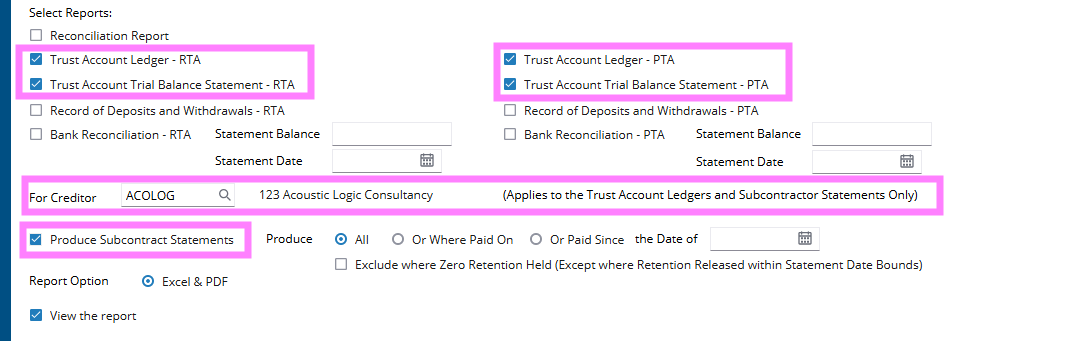
Having the ability to run your ledgers for individual Beneficiaries is also a requirement of QBCC certification and is now built into the PTA Reporting Suite.
Simply select the Creditor that you would like to report on individually and run reports as normal.
The Beneficiary/Creditor filter is currently available for:
- PTA Ledger
- RTA Ledger
- Subcontractor Statements
Comments
Article is closed for comments.