
2026 R4 Jobpac Release
Hide Nominated Subcontract Checkbox in Subcontract Maintenance
New system parameter to hide or show the Nominated Subcontractor checkbox.
Overview
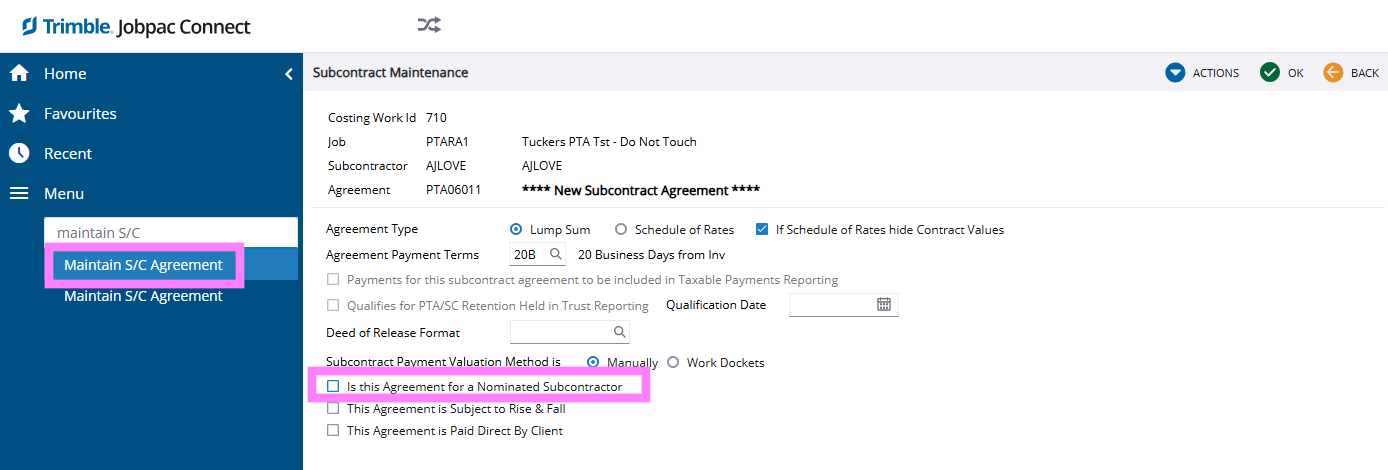
There is a new parameter to hide/show the rarely used Nominated Subcontractor checkbox in SC Agreement Maintenance.
Previously, if the checkbox was ticked by accident, it was difficult to turn off mid-contract, which created the need for support intervention.
By default, the checkbox Is this Agreement for a Nominated Subcontractor has now been hidden.
Example
System Parameter
If the checkbox is required for your organisation, it can be shown by activating the following system parameter position:
| System Parameter | SAGMNT |
| Position | 17 |
| Set To | Y |
| Result | Show "Is this Agreement for a Nominated Subcontractor" checkbox |
Comments
Article is closed for comments.