
2026 R4 Jobpac Release
New Email Address Tab in Menu User Maintenance
Review and update a user's email address before sending their Welcome Email.
Overview
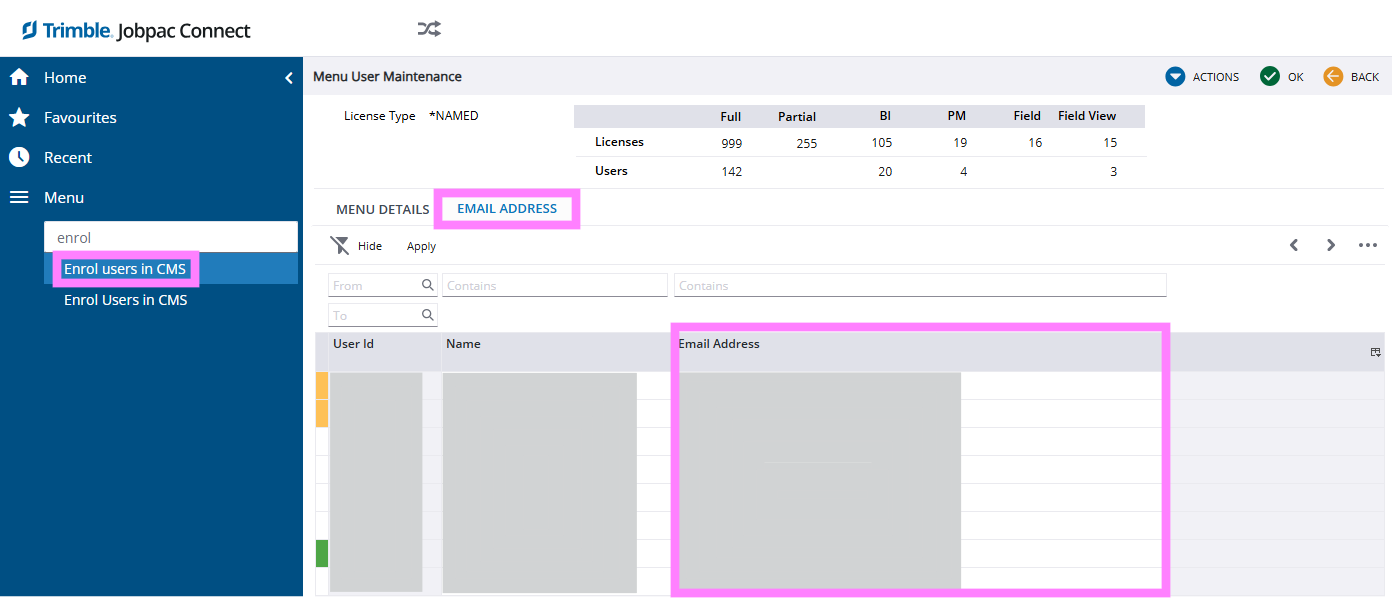
A new Email Address tab has been added to Menu User Maintenance (also known as Enrol Users in CMS).
This allows administrators to quickly review and, where appropriate, update a user's email address before sending a Welcome Email.
What's New
The new Email Address tab allows administrators to verify a user's email address during the user setup process.
This is particularly useful when preparing to send a right-click Welcome Email, helping ensure the invitation is sent to the correct address.
Example
Common Use Case
- Open Menu User Maintenance.
- Locate the user being enrolled in CMS.
- Navigate to the new Email Address tab.
- Confirm the email address is correct.
- Make any required updates.
- Send the Welcome Email.
Important Information
Updating the email address in Jobpac does not change the user's Trimble ID.
The email address associated with a user's Trimble Identity account is managed separately and cannot be updated through Menu User Maintenance.
Changing a Trimble ID Email Address
If a user needs to change the email address associated with their Trimble ID, they must update it through the Trimble Identity My Profile page.
Comments
Article is closed for comments.