
2026 R4 Jobpac Release
Copy Classification Default on Rates when Editing Asset Depreciation Overrides
Overview
When it is necessary for an asset to have different depreciation details than the classification of the asset, the override facility is used.
Previously when setting depreciation overrides the user needed to enter the override depreciation details from scratch.
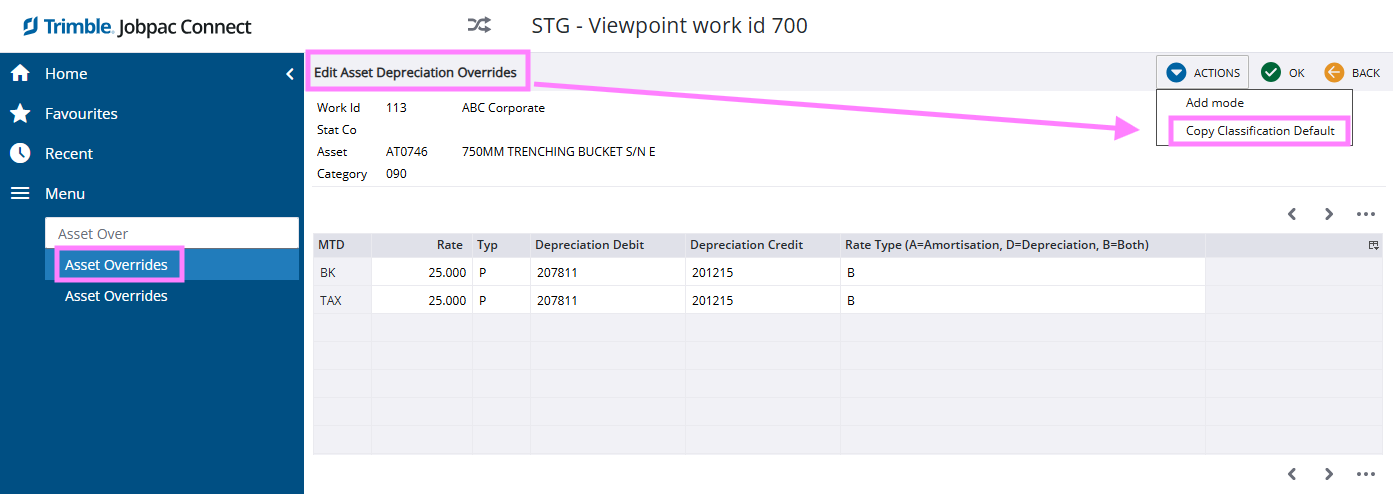
Copy Classification Default
To make this process easier, a new Action option called Copy Classification Default has been added.
Selecting this Action option will populate this screen from the depreciation defaults for that asset classification.
This will populate for both BK and TAX details.
The user just needs to then change the rate and save the override.
Example
Comments
Article is closed for comments.