
2026 R4 Jobpac Release
One Click to PO Matching
Overview
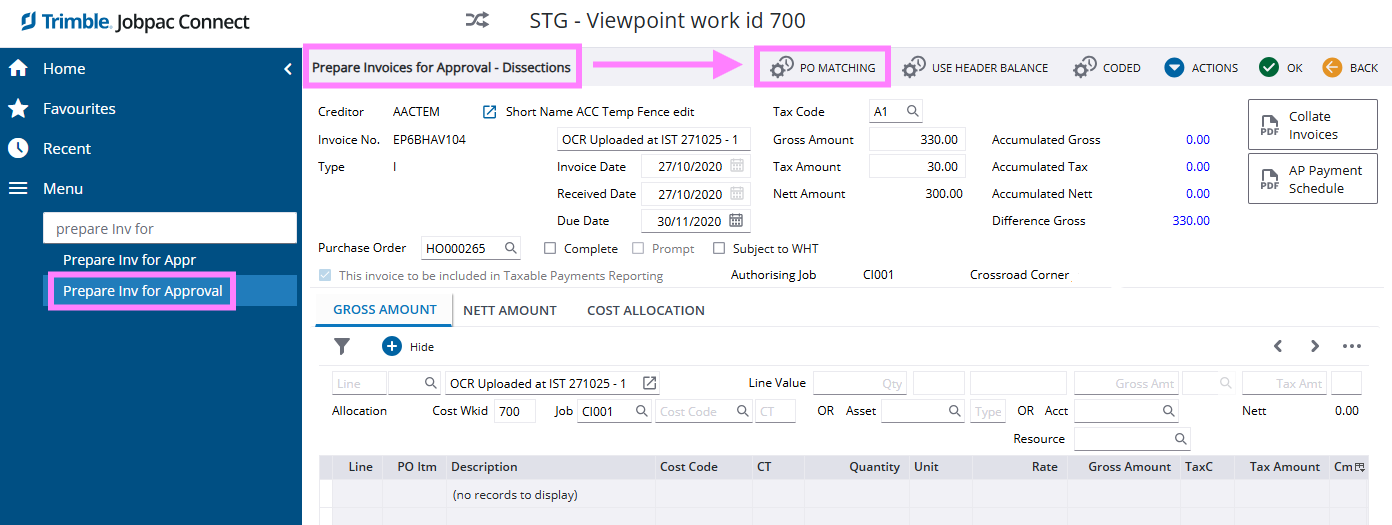
A One-Click productivity button has been added to the Prepare Invoices for Approval Details screen allowing users to more quickly access the PO Matching screen while preparing invoices.
Tip
Did you know that the PO matching and Delivery Docket matching can be automatically triggered as part of your Invoice coding workflow?
If you activate this workflow and a PO has been added to the pending invoice during the registration process, then when you select an Invoice for coding both the Delivery Docket Matching screen and the PO Matching screen will be automatically launched if applicable to the Invoice.
This workflow allows you to match to deliveries and PO’s to fully code the invoice before you reach the Invoice Details screen for final checking.
Position 13 of the System Parameter INVAPP activates this workflow.
We recommend you test in your test environment prior to activating live, and chat to a consultant if you are unsure.
Comments
Article is closed for comments.